Domain Seller Instructions
How to Become a Domain Seller
Instructions for becoming a Domain Seller with TopSellingDomain Marketplace
We use a fast online application process. It is not instant, but close to it! Below is the step by step instructions and workflow process for getting your free domain seller account. The steps don't take anymore than a few minutes to complete. Make sure you do each step in order.
FIRST: You can click on the home page header button that says "Become a Seller Now" at the top of the home page. Then follow the steps below.
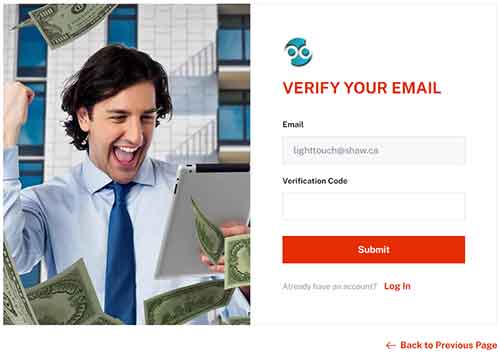
Email Verification
|
|

Fast Approval Registration Application

- After clicking on Submit, you are taken to the domain seller registration application page.
- VERY IMPORTANT. Fill in name, email and phone number fields completely. They are mandatory. This is the way domain buyers will be contacting you through your Domain Seller website we give you as well as on the TopSellingDomain Marketplace.
- Choose a password that is not easy to hack. For example numbers, letters and symbol combinations. You will be using this password to login to your domain seller portal and shop, so don't make it too hard that you can't remember. Writing it down and keeping it in a safe location works great.
- Confirm password by retyping in the exact password again.
- Type in a name you want for your own domain marketplace online shop. Think of this name as a brand. The name must be one word or hyphened between words.
- Type in your complete REAL address where you receive your mail. When you sell a domain to a buyer, a transfer of domain ownership (from you) to the buyer contract comes into play. This is done online and is fast; however, phone, email and address MUST be valid. This transfer of ownership contract is a legal document.
- Your shop site is now created. To login to your domain seller portal and shop, go to: https://topsellingdomain.com/seller/login . Type in your email address used to create the free account and the password you have chosen and click LOGIN button. If you forgot your password, click on "Forgot Password" link and reset your password.
Listing Domain for Sale in Seller Portal
You are sent to your domain seller portal where you can access and administer your shop site, list your domain in TopSellingDomain Marketplace which also shows up in your own shop site. You can also create your own auction for your domains and many more cool things.
Below are the easy steps to list your domain:
- Click on PRODUCTS in the left menu bar.
- Click on DIGITAL PRODUCTS.
- Click on the + sign at the top where it says "Add New Digital Product".
- Fill in the domain listing form completely. Make sure you choose the Product (Domain) Category as well as the "Select Main" category radio button.
- About IMAGE. Let us create your thumbnail image for your domain or domains. We have a standardized look and feel. You can see this on our site.
- Under PRICE field.. input the price you are asking for in whole numbers only. For example 1000 will show online as $1,000.00.
- Create a good description for your domain. This is your marketing of the domain. One or two lines of text will not sell your domain very good. You may choose to use AI to write your description for you.
- Choose "Save Product" to complete the listing of your domain.
- When listing a domain for sale on the TopSelliingDomain Marketplace, the domain ownership must be verified before the listing is posted to our domain marketplace as well as the seller's shop/marketplace website.
- The domain ownership verification is performed by the seller creating a DNS TXT record in the DNS Zone of the domain name whether the domain is web hosted on a server or with the domain's registrar.
How to Perform the Domain Ownership Verification:
- When the seller is finished creating the domain listing from their seller's dashboard/portal, they are sent to the listing of their domains they have for sale. A seller can get to their domain listings by clicking on PRODUCTS in the left menu bar, then clicking on DIGITAL PRODUCTS.
- The seller will then click on the green edit button that is by the newly listed domain name. DO NOT click Publish toggle.
- Once at the editing screen for the domain listing, the seller will see the domain ownership verification section instructions and the status of the domain is PENDING. While in this status, the domain listing is NOT published to the domain marketplace.
- Create the DNS TXT record at the domain's hosting company or domain registrar using the code specified in the instructions.
- After 15 to 30 minutes, return to the editing screen of the domain. If the status says FAILED, click on the "Re-Check Your DNS" button. If the creation of the DNS record is completed, the status of the listing will change to VERIFIED and your domain listing is then viewable/published in our domain marketplace and the seller's shop/marketplace website.
We Can Design Your Domain Marketplace Shop
We can assist you in designing your domain seller marketplace. We have whitelabeling which means the shop has your own logo, header, contact info and your own listed domains. Enjoy your domain seller portal and take the time to see all that you can do!
Contact us at anytime if you need assistance. We are here to help in any way we can. Your success is our success! Reach us by submitting a support ticket through your seller's dashboard/portal or email us directly at support@topsellingdomain.com.
Secure, Professional Transactions with Escrow.com